
For companies with employees moving between New York City headquarters and New Jersey offices, the quality of the meeting should not depend on which side of the Hudson River someone happens to be sitting on. A well-designed hybrid workplace should make an employee in a New Jersey satellite office feel as connected to the NYC headquarters as someone sitting in the next conference room.
That requires more than installing a large display and a webcam. Tri-State hybrid office standards should cover the entire meeting experience, including cameras, microphones, speakers, displays, room controls, acoustics, conferencing platforms, network infrastructure, and the way employees actually use the technology.
The goal is simple: create a consistent AV experience across locations so that people can walk into a meeting room in Manhattan, Newark, Jersey City, Princeton, or another New Jersey office and know how the meeting will work.
What Should a Hybrid Office Standard Include?
A hybrid office standard is a repeatable technology framework for meeting spaces across multiple locations. Instead of allowing every office to choose its own equipment and room configuration, companies establish common expectations for how people should join meetings, share content, hear one another, and interact with remote participants.
For NYC-to-NJ commuter teams, those standards can include the conferencing platform, room-control interface, camera capabilities, microphone coverage, speaker performance, display size, content-sharing method, cable requirements, network connectivity, and support procedures.
Microsoft, for example, maintains a certification program for Teams devices that evaluates areas including audio and video quality, user interface, device management, security, and compatibility.
The same principle applies when an organization uses Zoom Rooms or another conferencing platform. Zoom describes its meeting-room systems as combining dedicated cameras, microphones, displays, and room controls to create consistent physical spaces for hybrid collaboration.
For a company operating across the Tri-State Area, the standard should be written before equipment is purchased. That keeps the technology strategy consistent even when individual offices have different room sizes, architectural constraints, or budgets.
Start With the Meeting Experience, Not the Equipment
One of the easiest mistakes is to begin an AV project by asking which camera, display, or microphone to buy.
The better question is: What should a meeting feel like for everyone involved?
Imagine a project team with four people in a New Jersey conference room, two executives at the NYC headquarters, and three employees joining remotely. Everyone should be able to see the people speaking, hear conversations without repeatedly asking someone to repeat themselves, and share documents without a complicated sequence of adapters and cables.
The room should also make it obvious what to do when the meeting begins. A single-touch join experience, predictable controls, and clearly defined camera and microphone coverage can eliminate many of the small interruptions that make hybrid meetings feel more difficult than they need to be.
Microsoft’s guidance for team rooms similarly emphasizes the importance of selecting the right combination of room computer, displays, cameras, microphones, speakers, and other components based on the space and meeting requirements.
This is why the standard should describe the desired user experience first. Equipment should follow the requirements rather than become the requirements.
Make NYC and New Jersey Conference Rooms Feel Like the Same System
A company does not necessarily need identical hardware in every office. It does need consistent behavior.
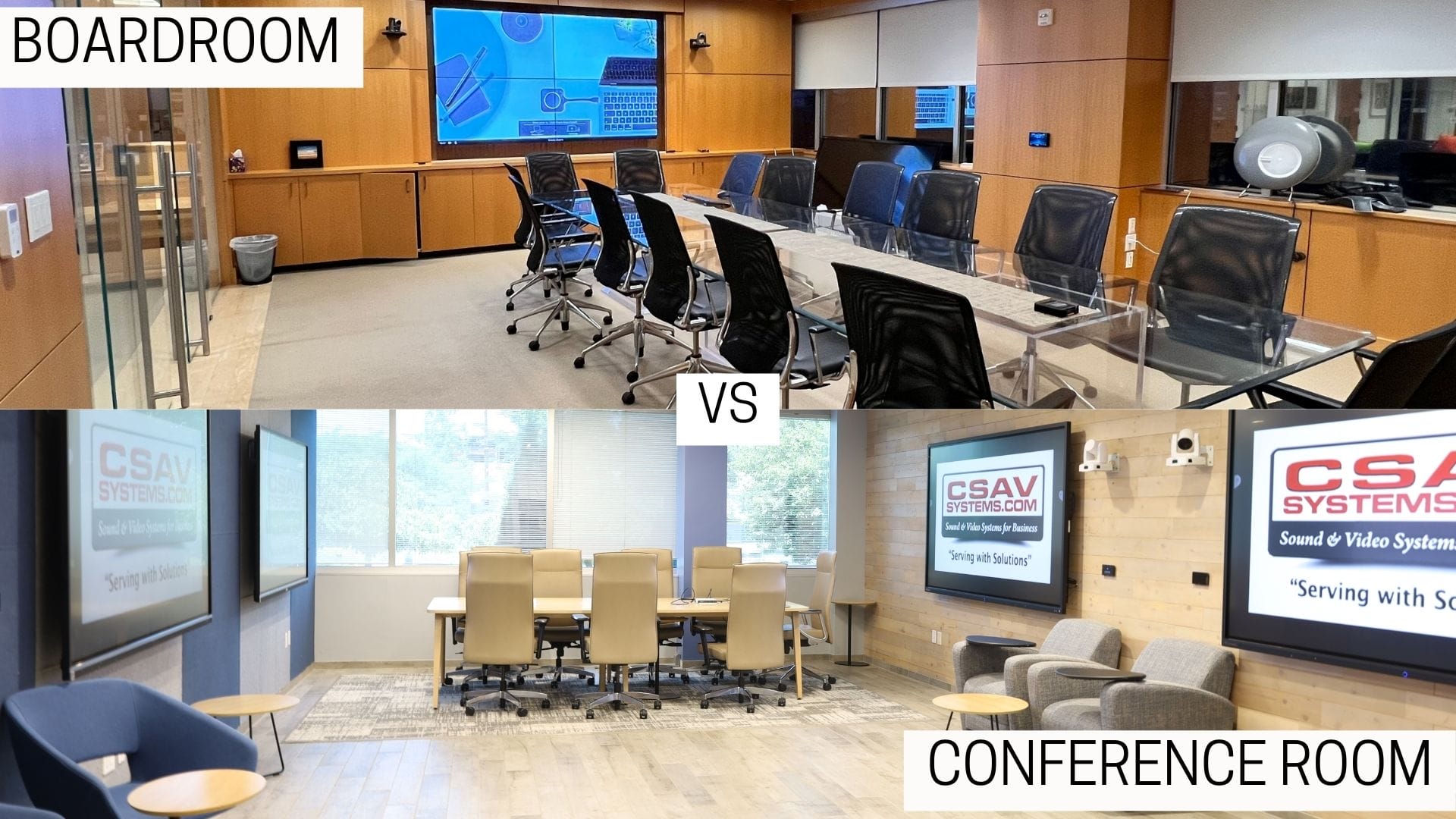
A large executive boardroom in Manhattan may require multiple displays, advanced camera coverage, ceiling microphones, and sophisticated room control. A smaller New Jersey satellite office may need a simpler configuration. The underlying user experience, however, can remain consistent.
The room interface should work in a familiar way. Meeting invitations should appear through the same platform. Content sharing should follow the same process. Camera behavior and microphone coverage should be predictable. Employees should not need to learn an entirely different AV system simply because they crossed the Hudson.
This approach is particularly useful for commuter teams. Employees may work in the NYC headquarters on Monday, visit a New Jersey office on Tuesday, and work remotely later in the week. Consistency reduces the amount of time spent adapting to the room instead of focusing on the meeting.
For organizations developing Tri-State hybrid office standards, this means defining a core room template and then creating variations for different room sizes.
A useful structure might include a small huddle room, a standard conference room, a larger collaboration room, and an executive boardroom. Each can have its own equipment requirements while maintaining the same basic controls and meeting workflow.
Audio Deserves as Much Attention as the Screen
A sharp video image cannot rescue a meeting where people cannot understand one another.
Audio problems are especially disruptive in hybrid meetings because remote participants depend entirely on the room’s microphones and speakers. A microphone that works adequately for one person sitting directly in front of it may perform poorly when six people are spread around a conference table.
Room acoustics also matter. Hard surfaces can create reflections and reverberation, while open offices can introduce conversations, equipment noise, and other distractions.
Microsoft’s hybrid meeting guidance notes that microphones can pick up background noise and recommends considering sound-dampening panels or room insulation where appropriate.
That makes acoustic planning part of the AV standard rather than an optional cosmetic upgrade.
Organizations should document where microphones are expected to cover, how speakers should be positioned, how background noise will be managed, and when acoustical treatment should be considered. For particularly sensitive meetings, companies may also want to evaluate sound masking and speech privacy.
The goal is to ensure every participant can hear and understand the conversation clearly. It is to make speech intelligible.
Cameras Should Capture People Naturally
Camera placement can determine whether remote participants feel like observers or actual participants.
A camera mounted too far away can make people appear small. A poorly positioned camera can create awkward angles or leave participants outside the frame. In larger rooms, one fixed camera may not provide enough coverage for presentations, discussions, and people seated at different parts of the room.
The right configuration depends on room dimensions, seating arrangement, meeting style, and platform capabilities.
Some organizations may benefit from intelligent camera features that frame speakers or provide different views during a meeting. Others may need multiple cameras to cover a large room or presentation area.
The important point is to standardize the outcome rather than mandate identical equipment everywhere. A New Jersey satellite office should produce a comparable meeting experience to the NYC headquarters even if its physical room requires a different camera configuration.
This is also where room design becomes important. Screens, cameras, lighting, furniture, and sightlines should be considered together rather than installed independently.
Treat the Network and Security as Part of the AV Design
A conference room is now a connected technology environment, not an isolated collection of screens and speakers.
AV systems can interact with conferencing platforms, corporate networks, room-booking systems, computers, displays, and other connected devices. That makes coordination between AV, IT, facilities, and security teams important when deploying standardized systems across multiple offices.
NIST guidance on enterprise telework and remote access emphasizes that technology used outside traditional facilities needs to be secured against expected threats, including devices and remote-access technologies.
For a Tri-State deployment, IT teams should establish requirements for network connectivity, device management, firmware updates, access controls, remote administration, and troubleshooting.
This also makes centralized monitoring valuable. If several New Jersey offices use standardized systems, an IT team can establish common procedures for diagnosing recurring problems instead of treating every conference room as a completely separate technology environment.
Security requirements should also be considered when employees connect personal devices to meeting-room systems. BYOD can make content sharing convenient, but organizations should determine how those connections fit within their existing security policies.
Build Standards That Can Adapt to Different Offices
Standardization does not mean every room should look identical.
A downtown Manhattan boardroom and a New Jersey satellite office may have completely different architectural conditions. One could have glass walls and limited ceiling space, while another might have a larger open floor plan and more flexibility for acoustic treatment.
Budget can also vary between locations.
This is where a tiered standard can be more useful than a single equipment list. Companies can establish minimum requirements for every room and additional requirements for rooms with more demanding use cases.
For example, every standard conference room might require reliable video conferencing, appropriate microphone coverage, a professional display, simple content sharing, and consistent room controls. Executive rooms could add multiple displays, enhanced camera coverage, advanced audio processing, and integrated control systems.
The standard should also specify what happens when a room cannot meet the default design. Exceptions can be documented rather than handled informally by whoever happens to be managing the project.
That creates a repeatable process while leaving enough flexibility for real buildings.
Why AV Planning Should Begin Before the Buildout
AV decisions are easier when they are made alongside architectural and electrical planning rather than after the room is finished.
The location of displays, speakers, microphones, cameras, cable pathways, electrical outlets, network connections, and control equipment can all affect the finished space. Retrofitting those elements later may require additional labor or visible equipment that could have been integrated more cleanly from the beginning.
This is particularly relevant when a company is opening a New Jersey satellite office that needs to mirror the technology standards of an existing NYC headquarters.
An AV consultant can review the organization’s requirements, evaluate the physical space, coordinate with architects and other project stakeholders, and develop a system that fits the room instead of forcing the room to accommodate disconnected equipment.
CSAV System works with businesses on custom audiovisual design, integration, installation, and support across New Jersey and New York. Its conference-room work includes solutions designed around hybrid meetings, video conferencing platforms, room controls, audio, displays, and other components that need to operate as one system.
A recent CSAV Systems corporate headquarters project in New Jersey, for example, incorporated executive meeting space, flexible collaboration rooms, a training room, huddle rooms, and a multipurpose area within one broader audiovisual design.
The Limitation: Standardization Can Go Too Far
There is a reasonable argument against making every office follow the same AV specification.
Technology standards that are too rigid can force organizations to buy unnecessary equipment or ignore legitimate differences between rooms. A small satellite office does not necessarily need the same system as a large executive boardroom.
The answer is to standardize the experience and core requirements, not every individual component.
A well-designed standard gives IT and facilities teams a common framework while allowing room-specific decisions where architecture, meeting size, acoustics, or budget require them. This approach can also make future upgrades easier because new equipment can be evaluated against an established set of requirements.
The goal is not technological uniformity for its own sake. It is a predictable collaboration.
A Practical Checklist for NYC-to-NJ Hybrid Office Standards
Before deploying a standardized AV system across multiple offices, organizations should be able to answer several basic questions.
Does every conference room provide adequate microphone coverage for the people who actually use it?
Can remote participants clearly see and hear everyone in the room?
Can employees join a meeting and share content without searching for cables or calling IT?
Are room controls consistent enough that employees can move between locations without relearning the system?
Are displays, cameras, microphones, speakers, and room controls appropriate for the physical size and purpose of each room?
Are conferencing platforms and hardware compatible with the company’s IT and security requirements?
Can IT or an AV support team identify and troubleshoot problems efficiently?
Is the AV infrastructure documented so that future upgrades do not depend on institutional knowledge held by one person?
And was the AV system considered early enough in the construction or renovation process to avoid unnecessary retrofits?
If the answer to most of these questions is yes, the organization is moving toward a genuine hybrid workplace standard rather than simply adding video conferencing equipment to traditional conference rooms.
Frequently Asked Questions
What is a hybrid office AV standard?
A hybrid office AV standard is a set of technical and user-experience requirements that defines how meeting rooms should support in-person and remote participants. It can cover cameras, microphones, speakers, displays, conferencing platforms, room controls, networking, acoustics, and support procedures.
Should NYC and New Jersey offices use identical AV equipment?
Not necessarily. The rooms may have different sizes, layouts, budgets, and acoustic conditions. A better approach is to establish common performance and user-experience requirements while allowing equipment configurations to vary when the physical space requires it.
What AV equipment is needed for a hybrid conference room?
A typical hybrid room may require a display, camera, microphones, speakers, conferencing-room compute or compatible meeting device, room controls, content-sharing capability, and appropriate network connectivity. The exact configuration depends on room size, seating arrangement, meeting type, and conferencing platform.
How can companies make hybrid meetings consistent across multiple offices?
Companies can create standardized room types, use compatible conferencing platforms and certified devices, establish consistent control interfaces, document network and security requirements, and provide user training. The goal is for employees to encounter the same basic meeting workflow regardless of location.
When should AV planning begin for a new office?
AV planning should begin during the design and construction process, before walls, ceilings, electrical systems, furniture, and cable pathways are finalized. Early coordination can help prevent conflicts and reduce the need for expensive or visually intrusive retrofits.
A consistent AV standard can make the difference between a collection of connected conference rooms and a workplace that genuinely operates as one organization across the Tri-State Area.